

Software & Solutions
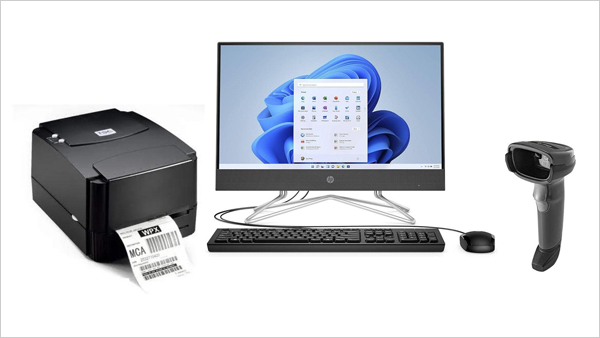
Barcoding and software-integrated weighing systems
Barcoding integrated into weighing systems combines hardware and software to automate data capture, improve accuracy, and increase efficiency in various industries, from retail to manufacturing The core process involves linking a weighing scale with a barcode printer or scanner, allowing product weight and identity to be recorded simultaneously.
Hardware components
1. Barcode printing scales
These are all-in-one units that integrate the weighing mechanism, a display, and a built-in thermal printer
- Capacity and accuracy: Available in various capacities and with different levels of precision to tons
- Interface: Features often include a large LCD or graphical display and a mechanical keyboard with pre-set keys for quick product selection
- Connectivity: Modern scales offer various connectivity options like USB, RS-232, Ethernet, and wireless connectivity (Wi-Fi, Bluetooth) for integration with back-end systems
2. Weighing scales with external scanners and barcode printers/ receipt printers
This setup pairs a standard electronic weighing scale with an external barcode scanner or a printer connected to a PC or other point-of-sale (POS) device.
- Scanner types: Can use various scanner types, including handheld, fixed-mount, or mobile scanners, depending on the application.
- Data flow: When a barcode is scanned, the scanner sends product information to the system. The weighing scale simultaneously sends the weight data. Software combines this data for processing.
3. Weighbridge systems
- Used for industrial applications involving heavy vehicles and bulk materials, these systems integrate weighbridges with barcode readers to automate the weighing process. A common process is for a driver to receive a barcode ticket on arrival, which is then scanned on departure to record the transaction and weight data automatically.
Software architecture and features
1. Item master configuration
The central database within the software holds all product-related information.
- Key data: Includes the product's Price Look-Up (PLU) code, name, unit of measure (e.g., kg or unit), price per unit, and tax information.
- Classification: The software distinguishes between "weighable" items (like produce) and "countable" items (like individual eggs) to apply the correct billing logic.
2. Barcode and label generation
The software is responsible for creating and printing the barcode labels.
- Customizable format: Barcodes typically follow a consistent format, which can include a prefix, the item's PLU code, weight, and price amount.
- PLU: A product's PLU code.
- Weight: The weight of the item.
- Customization: The software allows for different label sizes and the inclusion of extra information, such as product ingredients, supplier, and branding.
3. Integration with POS and ERP systems
Seamless data synchronization is a critical function of the software.
- Real-time updates: The weighing system can be integrated directly with a POS or Enterprise Resource Planning (ERP) system to automatically update inventory levels and synchronize prices.
- Centralized control: For businesses with multiple locations, a centralized web portal can manage user authorizations, generate reports, and control data across all weighing scales.
- Database syncing: Scale software can push updated product information (like prices) to all connected weighing scales to ensure data consistency.
4. Data management RM, stores applications and reporting integrating with ERP
The software provides a robust system for handling transaction and inventory data.
- Data capture: The system captures and records data points such as the item barcode, weight, date, time, and operator.
- Web interface: Data can be viewed in real-time through a web interface, providing management with up-to-date information on inventory and sales.
- Reporting: Customizable reports can be generated for sales tracking, inventory analysis, and regulatory compliance.
Technical communication and data transfer
1. Communication methods
- Wired: Direct connections via RS-232, USB, or Ethernet are common for reliable data transfer.
- Wireless: Wi-Fi and Bluetooth connectivity offer greater flexibility and convenience for mobile and tablet-based applications.
2. Data formats
- Continuous mode: Scales can send a continuous stream of weight data to the software, which is useful for applications that need to monitor weight changes in real-time.
- Stable mode: Some scales only transmit the weight data once the reading has stabilized, preventing inaccurate data from being captured.
- File transfer: Product master data can be exchanged via files such as .csv or .xml, which are uploaded from the POS to the scales.
Key Benefits And Applications
Benefits
- Increased accuracy: Reduces manual data entry errors in pricing and inventory.
- Enhanced efficiency: Automates processes to speed up operations and checkout times.
- Improved inventory control: Enables real-time tracking of stock levels and provides better data for management.
- Data-driven insights: Accurate weight data provides a reliable basis for cost accounting and reporting.
Applications
- Retail: Used in supermarkets and grocery stores for produce, meat, and bulk items sold by weight.
- Logistics and warehousing: Assists in weighing and labeling shipments for tracking and inventory management.
- Manufacturing: Supports precise component weighing for quality control RM, Dispensation, and batch traceability.
- Pharmaceuticals: Ensures accurate labeling and compliance for weight-based measurements.